I decided to do something I rarely do – download beta software and start playing with it. I used to do it all the time. You would scream beta and I’m there using it. I downloaded the QGIS 1.9 master and started looking for things that are different. Things that stick out. I decided I would just start talking about things that are different until 2.0 comes out. I saw a code freeze email this week and a proposed date of Mid June (If I’m not mistaken) for the release. So what did I notice first…
Editing.
When I taught the Qgis class one of the things that people noticed was the ability to edit multiple layers at once. All the layers (per ArcGIS) didn’t necessarily have to be in the same directory or workspace. Data in two different directories that could be actively edited.
See – edits have a small pencil beside them and both of these are in different directories.
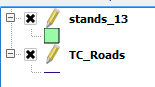
Edits would be made. Mistakes could be pushed back using the undo button/menu pick. Now it gets a little bit nicer in 2.0. Now with a new “Current Edits” button and a new menu choice (found by right clicking the layer) you can save, roll back (undo), or cancel editing. See the new orange pencil to the left of the yellow one.
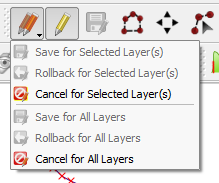
Also the icon set is new. Over all is it that big of a deal? Yes and no. It does show that people are paying attention. New icon sets and some user improvements in editing. It makes life a bit easier (IMO) on the editing front. I now have about four places to roll back an edit instead of two – and new tools are in easier to get to spot. To me it’s more intuitive. We’re used to right clicking for abotu anything. Right click your layers and do the same thing on editing and undoing those edits.
So editing gets some new tricks with expanded ability to undo/save/rollback edit changes. Every few days I’m going to download the newest 1.9 master and talk about something new. Small things and big things. Stay tuned.