
This is cool.
So – North Road ran a crowd funding campaign to get this into the core component of QGIS. There was a plugin – and to be honest I discovered that about the same time as the crowdfunding was announced. The campaign put the plugin into the core parts of QGIS.
What happens is you have pick lists that can change based on other values. Have a pipe? It can be made out of W, X, Y, and Z. Is it a Water Pipe? It can only be made of X and Z. Wastewater Pipes can only be made of W and Y.
I worked my way through setting this up – and it’s really not bad once you know how. Granted – had I listened to the above video more closely it would have made better sense starting out.
Here is my walk through. I have a point layer and that point layer has a type and a subtype. I stored this all in a Geopackage by the way. The type drives the subtype. So you pick A and you can only have red or blue. Maybe B is green and white. I made two tables to help with this process tableA is 2 fields: a primary key and a value. TableB has three fields: a primary key, a value, and a foreign key that relates back to Table A. From that you can see Type A can only have a value of Red and Blue. Type D can only be Black and Gray.
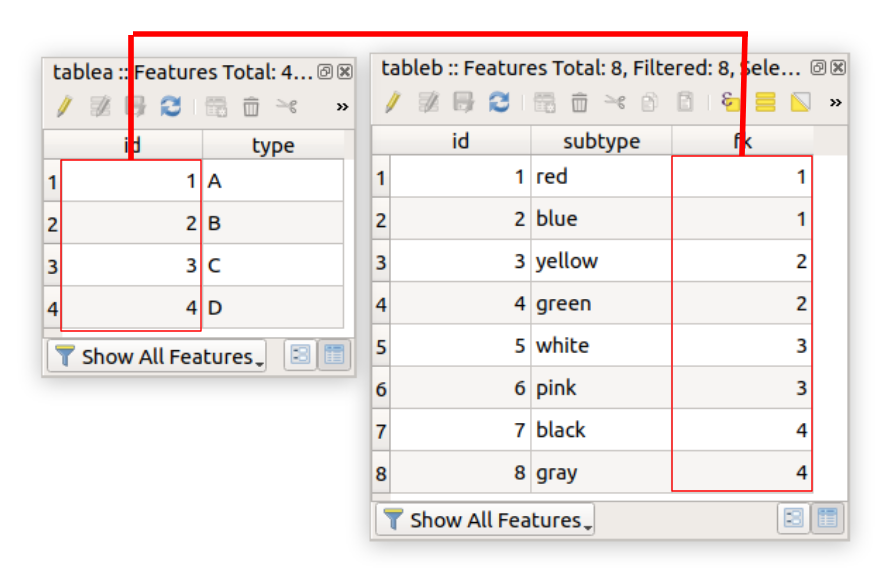
Here’s where it gets a little bit fun. My point layer has two attributes of concern: type and subtype. Type will be A,B,C, or D. Subtype will be a range of colors that Match the Type picked. If you right click the layer and select attribute forms you can assign a form for data entry. In this case for type the key column is the primary key and the value is the type. Note the Widget type is Value Relation!

Lets looks at the subtype field. The key column is the Foreign Key (the part that relates it back to table A). The value column is the subtype. The magic is this – if you look at the filter expression:“fk” = current_value(‘type’) . Check it out Below:

The foreign key equals the value of the type widget. When you add a point you’ll see this (nothing crazy). The type drives the subtype.
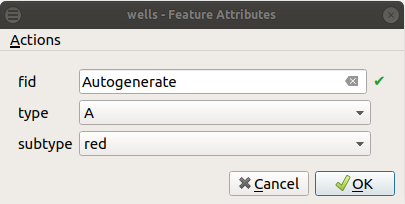
BUT WHEN YOU USE IT:

So you have a drive down list. Utilities usage? There’s more functionality with this you can exploit through the field calculator and the widget lists. It’s another greater way to control your data editing. So don’t be lazy – create great data to drive your database.




