
There are a number of things I just “do” in QGIS these days and don’t think twice about them. Work is picking up on the FOSS4G side of life and I find myself more going “Well yeah you just do X and then you have Y – I thought people knew that.”
Today turned into a discussion on the Authentication manager. So what is it and why should you care? This will be a 2 parter.
If you’ve used postgis with QGIS – you’ve seen this part of a menu pop up at some point.
 You can supply a username and a password and connect to things. My “thing” is currently PostGIS/PostgreSQL and I use this a lot. The bad part is my credentials are stored in plain text. All I need to do is pop open the QGIS file or a qlr file with a text editor and my credentials are sitting there for the world. If you were to click on the red box labeled configurations (as pictured above) you get a different menu.

Click add and set a password you will remember:
 and here we are:


You provide a Name and in my case I name it for what I’m going to be doing: “PostGIS” and then my postgres/postgis credentials. You can let it generate an ID or set one yourself. When you save it it creates a spatialite database in your .qgis2 directory. From here going forward you’re going to be asked for the master password that you set in the very beginning. You can have different Authentication credentials for each part of your QGIS life. I might have one for PostgreSQL, SQL Server, Geoserver, etc.
So what happens after it’s set – let me connect to a table in postgis after setting up my connection:
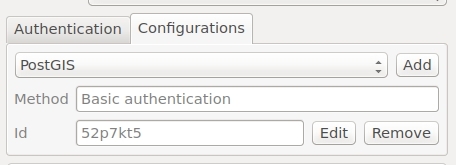 and I connect:

Notice my password and login are now hidden by the Authcfg ID – which I let default to some alphanumeric combination. Maybe you don’t want it to default (which will be part 2’s discussion).
Why worry about it? Maybe you are in a corporate environment and your password into things is a bit important. Maybe you are hitting web services and have a PKI Certificate.
So – if you want all the information go here because I have no doubt missed something or confused some aspect of the explanation. Like I said – all of this started with me going “Hey you should….” and the client going “WHAT”.
Security – it’s not overrated.




